
Excel University Blog
Read on for in-depth articles, tutorials, and videos. Search or browse for specific topics. Be sure to subscribe if you'd like to be notified when we write something new.
Features
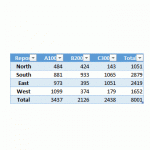
Recently, I’ve been on this kick of using Get & Transform queries to accomplish tasks that we previously performed with other methods. It is clear that the Get & Transform commands provide new ways to solve old problem. In this post, I’ll demonstrate how we can use a Get & Transform query to transpose values.…
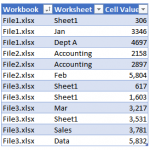
Alright my friends, this week I’ll tackle a question I received about retrieving values from workbooks. Here is the basic idea of the question. I have a folder with several hundred workbooks, and each workbook may contain any number of worksheets. For example, some workbooks have two sheets, some have three sheets, and some have…

I recently received a question about how to find the most recent transaction date of a list of items. There are a few fun ways to accomplish this, and so I thought I’d walk through three options. Thanks Darrell for your question! Objective The exact question from Darrell is: “I have a data table of…

I really like to highlight input cells by applying the Input Cell Style. I also like to try to place all of the input cells for a workbook on a single worksheet. That way, it is easy to update the input cells, and since they aren’t on any of the sheets I need to print,…
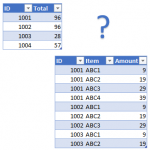
In this post, we’ll use a Get & Transform query to help with our reconciliation. The idea for this post came from a question from Laura (thanks Laura!) The basic idea is that we have two worksheets. One contains the invoice totals and the other contains line item details, where there are many line items per…

Have you ever tried to do some type of calculation with a time value in Excel, only to receive a strange result? Two examples are adding up hours on a time sheet and multiplying the number of hours worked by a pay rate. If you’ve tried something like this and encountered an unexpected result, the…

In recent back-to-back webinars, two different attendees asked how to check to see if a user entered a text string with all caps. Specifically, they asked how to set up a data validation rule to determine if all letters are capitalized. So, I figured I would write a quick post about the technique. Objective Let’s just take a moment…
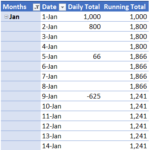
When you download banking activity, you typically get the transactions, but not the daily bank balance. To compute the daily bank balance, you need to summarize the transactions by day and display a running total for all days, even those without any activity. This post demonstrates how to build such a report using a PivotTable. Overview…

If you haven’t played with the Get & Transform commands in Excel 2016 for Windows, they’re probably worth checking out. I don’t want to sound overly dramatic here, but this set of capabilities is a game changer. These tools provide new ways to approach tasks, and enable us to do things that were previously time-consuming, impractical or required macros. If you’d like to…
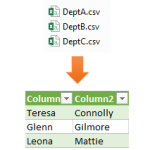
Let’s say you have several data tables, and you need to combine them into a single table. One option would be to copy and paste to append them. But, depending on how many data tables there are, this type of manual process can be tedious. In this post, we’ll use a Get & Transform query…