
Excel University Blog
Read on for in-depth articles, tutorials, and videos. Search or browse for specific topics. Be sure to subscribe if you'd like to be notified when we write something new.
Functions

My Excel-friend John Michaloudis has compiled a podcast with tips from 17 Excel experts and MVPs. He does this annually, and this year he has put together a great collection of tips. This year, you’ll hear tips from: Bill Jelen John Michaloudis Mynda Treacy Jeff Lenning Jon Acampora Danielle Stein Fairhurst Ken Puls Kyle Pew…

Excel has numerous date-related features and functions. In this post, we’ll explore a few of them. We need an illustration that will tie them all together, so, we’ll create a graphical calendar with a PivotTable. Even if you don’t need a graphical calendar in your workbooks, the underlying mechanics that enable us to build it…

Here’s the situation. We have created a PivotTable and related PivotChart, and, since we are nice, we have also provided a Slicer so that the user can easily make selections. But, we’d like the report titles to dynamically update based on the selections made. As with anything in Excel, there are multiple ways to accomplish…
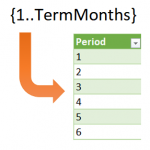
Sometimes in Excel, we want to use formulas to compute row values, but, the number of rows is dynamic and changes periodically. For example, let’s say we want to create an amortization schedule and use it for a variety of loans. Some loans are paid in 36 months, some in 120 months, and some in…
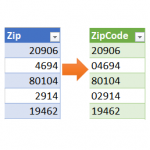
Power Query is an amazing tool, and I love learning about it. In the Power Query Editor, as you click the command icons, Excel is actually writing M code behind the scenes. M code has many more functions than are available in the ribbon. So, the thing to keep in mind is that if you…

You want to perform a lookup with VLOOKUP, but, there are multiple lookup columns. So, what are you supposed to do? Combine them into a single lookup column? That is certainly one option, but, as with just about anything in Excel, there are multiple ways. In a previous post, I showed one way to do…
If you like shortcuts, features, and tools that can save you time in Excel, I’d like to call your attention to a Journal of Accountancy article that includes tips from several Excel experts. I’m honored that my tips were included in the article 🙂 The article includes these main categories of tips: Keyboard shortcuts Quick…

Psychologist Abraham Maslow wrote a line that is often referred to as Maslow’s Hammer. It goes something like this: “I suppose it is tempting, if the only tool you have is a hammer, to treat everything as if it were a nail.” I’ve heard the simplified version more often: “If all you have is a…
Let’s say we want VLOOKUP to match the lookup value “North Region” with “North Region Subtotal” stored in the lookup range. We started this series by looking at the 4th argument. We know it can be TRUE or FALSE. FALSE means exact match and TRUE means approximate match. So, what exactly is an approximate match?…
Here’s a VLOOKUP question for you: What happens when the lookup value includes extra spaces? For example, a few trailing spaces, or leading spaces, or, extra spaces in the middle of the text string. When the lookup value has extra spaces, but the lookup range values don’t, VLOOKUP runs into problems. This leads us to…