
Excel University Blog
Read on for in-depth articles, tutorials, and videos. Search or browse for specific topics. Be sure to subscribe if you'd like to be notified when we write something new.
PivotTable

This is the 3rd post in the Impossible PivotTables series. This series is designed to explore Power Pivot. I thought looking at a few limitations of traditional PivotTables would be a fun way to do this. So, in this post, we will look at how traditional PivotTables support a single data table while Power Pivot…
This is the second post in the Impossible PivotTables series, where we are exploring Power Pivot. In the first post, we examined the limitation of calculated field references in a traditional PivotTable. In this post, we’ll address the limitation of using the Show Values As option for subsequent calculations. If we use the Show Values…
This is the first post in a series called Impossible PivotTables. The purpose of this series is to explore Power Pivot. I thought a fun way to do that would be to demonstrate how using the data model enables us to build PivotTables that are either impossible with traditional PivotTables or that require workarounds. I…

If you use PivotTables often, you’ve probably wished there was a way to set default PivotTable layout options. For example, if you prefer Tabular instead of the default Compact, it sure would be nice if all new PivotTables used the Tabular layout. Well, depending on the version of Excel you have, you may in fact be…
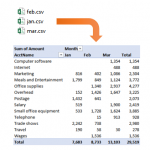
In this post, we’ll summarize data from multiple CSV files with a PivotTable. Specifically, we’ll use a Get & Transform query (Power Query) to retrieve and prepare data from numerous CSV files. Then, we’ll send the query results into the data model (Power Pivot). Then, we’ll build our summary report using a PivotTable based on…

Traditional PivotTables are an incredible feature of Excel, but, they are not without limits. Many of the typical restrictions are removed when you use the data model rather than a single Excel table. If you’d like to learn how to build a PivotTable using the data model, and learn what the data model is, strap…

If you have ever downloaded bank activity from your bank’s website, you know there is some amount of cleaning you need to do before the data is ready to use. Perhaps the next step is to summarize the bank activity with a PivotTable, or, perhaps to perform a bank rec. Regardless of your ultimate objective,…
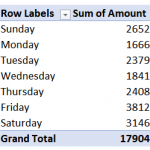
Using the Data Model (or Power Pivot) helps us build some amazing PivotTables. A date table (or calendar table) is integral to most data models as they allow us to group reports by various date periods and use a wide variety of time intelligence functions. Although there are many ways to build such a date…
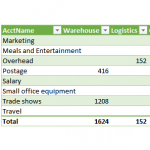
I love PivotTables, and use them all the time. But, when our needs are simple, we can easily summarize data with a Get & Transform query instead. Why? To simplify our workbooks and improve our efficiency. Let me demonstrate. Objective Before we dig into the mechanics, let’s just be clear about our goal. Let’s say…

I recently received a question about how to find the most recent transaction date of a list of items. There are a few fun ways to accomplish this, and so I thought I’d walk through three options. Thanks Darrell for your question! Objective The exact question from Darrell is: “I have a data table of…