
Excel University Blog
Read on for in-depth articles, tutorials, and videos. Search or browse for specific topics. Be sure to subscribe if you'd like to be notified when we write something new.
Jeff Lenning
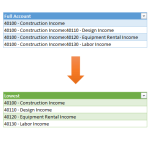
Sometimes, our data has multiple delimiters. Finding the first delimiter with formulas has been pretty easy over the years. Finding the final delimiter hasn’t been as easy…until now. In this post, we’ll use a Get & Transform query to grab the characters after the last delimiter. Objective Before we jump into the mechanics, let’s be clear about…

It is with great pleasure that I’m able to announce this year’s Excel University scholarship winners! The scholarship is supported by Excel University enrollments, so, thanks to all of you who have helped to make this possible. Both of these winners are wonderful examples of the type of accounting student that the Excel University scholarship was…

Excel has a built-in web browser that can be used to view web pages and import selected web data. This browser worked well for many years, but, recently, script errors began appearing on some pages. This makes it challenging to import data from some web pages, and frustrates users. The good news is that we can…

Since many of Excel’s features are designed to work with data stored in a flat, tabular format, we sometimes need to flatten data that is received in other formats. In a previous post, we discussed a manual way to flatten data. In this post, we’ll use a Get & Transform Query as an alternative to…
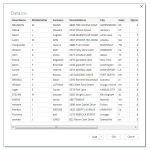
Excel 2016 includes a set of features called Get & Transform. In previous versions of Excel, these capabilities were included in the Power Query Add-In. In this post, we’ll see how a Get & Transform Query can be used as an alternative to a VBA macro. Overview Here is the scenario. We export data out of…

In this post, we’ll create a drop-down that contains a unique list of choices derived from a column that contains duplicate values. This may sound familiar as we previously accomplished this with a PivotTable. However, the Power Query feature that’s built-in to Excel 2016 makes this process easier. Objective We have a data table that contains RepID,…

If you get stock quotes into Excel by typing or copy/pasting from your web browser, you may be able to get your work done faster if you use a built-in Excel feature. Excel’s external data feature enables you to retrieve data from a variety of sources—one of which happens to provide stock quotes. Check out…

Excel easily summarizes flat, tabular data. When data is stored in a crosstab style format instead, Excel users have to spend a bit of time preparing the data for use. There are many ways to accomplish just about any Excel task, but in this post, I’ll demonstrate how to quickly unpivot the data. Thanks to Patrick who…

Back in the old days, when I used workpapers that were made with, you know, paper, I used a red pencil to create cross-references that made it easy to navigate to related documents. Today, I use Excel hyperlinks instead. Check out this CalCPA Technology and Business Resource Guide article where I describe how to use Excel hyperlinks to cross-reference digital…

I recently had the immense pleasure of being a guest on the My Excel Online Podcast with John Michaloudis. He is a PivotTable master and an Excel friend. If you’d like to listen to the audio interview, I’ve provided the link below. While you are there, be sure to subscribe to John’s podcast, he does an amazing…