
Excel University Blog
Read on for in-depth articles, tutorials, and videos. Search or browse for specific topics. Be sure to subscribe if you'd like to be notified when we write something new.
Techniques

This is the third and final post in the Speed Loop series. In the first post, we identified and prepared our recurring-project workbooks for speed. In the second post, we increased their value by improving efficiency and accuracy. Now it is time to leverage our time savings. The final step is: Realize Gain. Before we…
To work fast in Excel, you need two things: process and skills. Having one without the other means you may not be maximizing efficiency. By process, I mean the overall framework, strategy, or approach you use to optimize your workbooks. By skills, I mean Excel skills like XLOOKUP, SUMIFS, PivotTables, and Power Query. Both process…

A few years ago, I wrote a post about how to perform fuzzy lookups using the “Fuzzy Lookup Add-In for Excel.” However, this capability is now available in Power Query!! Wait, what? Yes! Performing a fuzzy match is so much easier and far more intuitive in Power Query. This post walks through the basics ……

A while ago, I wrote about creating dependent (aka cascading, dynamic, or conditional) drop-downs using data validation. This is where you have a primary drop-down, and the choices in the related secondary drop-down depend on the selection made in the first drop-down. Well, this process became MUCH easier with the introduction of dynamic array functions…

A few weeks ago I wrote a blog post on how to create a graphical calendar using a PivotTable. I received a few questions about how to insert event names into the calendar. Generally, PivotTable value fields support numeric values (such as day 1, 2, 3), and not text values (such as Filing Deadline or…

My Excel-friend John Michaloudis has compiled a podcast with tips from 17 Excel experts and MVPs. He does this annually, and this year he has put together a great collection of tips. This year, you’ll hear tips from: Bill Jelen John Michaloudis Mynda Treacy Jeff Lenning Jon Acampora Danielle Stein Fairhurst Ken Puls Kyle Pew…

Here’s the situation. We have created a PivotTable and related PivotChart, and, since we are nice, we have also provided a Slicer so that the user can easily make selections. But, we’d like the report titles to dynamically update based on the selections made. As with anything in Excel, there are multiple ways to accomplish…
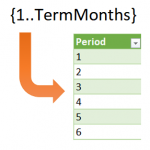
Sometimes in Excel, we want to use formulas to compute row values, but, the number of rows is dynamic and changes periodically. For example, let’s say we want to create an amortization schedule and use it for a variety of loans. Some loans are paid in 36 months, some in 120 months, and some in…
My Excel-friend John Michaloudis does an annual interview of Excel experts from all over the world. The format of his interview is an audio podcast. This year, you can hear directly from 20 Excel experts as they share their best Excel tips and ideas. The tips include shortcuts, functions, and features, and it is a…
If you like shortcuts, features, and tools that can save you time in Excel, I’d like to call your attention to a Journal of Accountancy article that includes tips from several Excel experts. I’m honored that my tips were included in the article 🙂 The article includes these main categories of tips: Keyboard shortcuts Quick…