
Excel University Blog
Read on for in-depth articles, tutorials, and videos. Search or browse for specific topics. Be sure to subscribe if you'd like to be notified when we write something new.
Excel

This is the first post in a series called Impossible PivotTables. The purpose of this series is to explore Power Pivot. I thought a fun way to do that would be to demonstrate how using the data model enables us to build PivotTables that are either impossible with traditional PivotTables or that require workarounds. I…
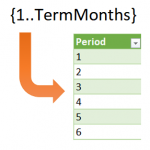
Sometimes in Excel, we want to use formulas to compute row values, but, the number of rows is dynamic and changes periodically. For example, let’s say we want to create an amortization schedule and use it for a variety of loans. Some loans are paid in 36 months, some in 120 months, and some in…
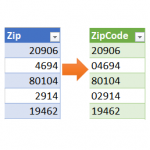
Power Query is an amazing tool, and I love learning about it. In the Power Query Editor, as you click the command icons, Excel is actually writing M code behind the scenes. M code has many more functions than are available in the ribbon. So, the thing to keep in mind is that if you…
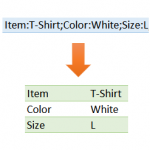
This is the second of two related posts that demonstrate how to use Power Query to deal with rows and delimited lists. In the first post, we combined rows into a delimited list. In this post, we’ll do the opposite and convert a delimited list into rows. Well, what are we waiting for … let’s…
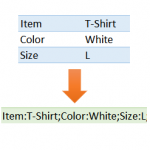
This is the first of two related posts that demonstrate how to use Power Query to deal with rows and delimited lists. In this first post, we’ll combine rows into a delimited list. In the second post, we’ll do the opposite and convert a delimited list into rows. Well, what are we waiting for ……

I’m assuming you love PivotTables. I mean, who doesn’t, right? Well, traditional PivotTables are amazing, but they’re not without limits. Instead of using a traditional table as the PivotTable source, you can take your PivotTables to the next level when you use Power Pivot instead. In this California CPA Magazine article, I talk about a…

It is time for another breakout puzzle … yay! Have you ever played Sudoku? My family loves doing these puzzles, in fact, last week we had a full-on Sudoku race and competition. Who won? Not me. My daughter totally crushed it. I’d get like 5 squares done, and she’d be like, “done!” Again and again.…
It is time for another Excel Breakout Puzzle! Excel Breakout Puzzle? Yes … they are totally fun 🙂 You have to use your Excel knowledge and skills to find the hidden code. I’ve hidden a 5 digit code in an Excel workbook, and if you are up for the challenge, see if you can find…

If you use PivotTables often, you’ve probably wished there was a way to set default PivotTable layout options. For example, if you prefer Tabular instead of the default Compact, it sure would be nice if all new PivotTables used the Tabular layout. Well, depending on the version of Excel you have, you may in fact be…
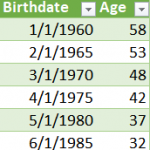
In this post, I answer a question from Emmanuel who asked how to compute the age when given a list of birth dates. We want the solution to be dynamic, so that it is easy to update the age calculation going forward. Since this is Excel, there are many ways to accomplish this. In this…