
Excel University Blog
Read on for in-depth articles, tutorials, and videos. Search or browse for specific topics. Be sure to subscribe if you'd like to be notified when we write something new.
Excel

You want to perform a lookup with VLOOKUP, but, there are multiple lookup columns. So, what are you supposed to do? Combine them into a single lookup column? That is certainly one option, but, as with just about anything in Excel, there are multiple ways. In a previous post, I showed one way to do…
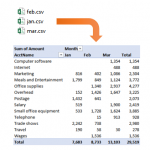
In this post, we’ll summarize data from multiple CSV files with a PivotTable. Specifically, we’ll use a Get & Transform query (Power Query) to retrieve and prepare data from numerous CSV files. Then, we’ll send the query results into the data model (Power Pivot). Then, we’ll build our summary report using a PivotTable based on…

Traditional PivotTables are an incredible feature of Excel, but, they are not without limits. Many of the typical restrictions are removed when you use the data model rather than a single Excel table. If you’d like to learn how to build a PivotTable using the data model, and learn what the data model is, strap…

If you have ever downloaded bank activity from your bank’s website, you know there is some amount of cleaning you need to do before the data is ready to use. Perhaps the next step is to summarize the bank activity with a PivotTable, or, perhaps to perform a bank rec. Regardless of your ultimate objective,…

My Excel-friend John Michaloudis does an annual interview of Excel experts from all over the world. The format of his interview is an audio podcast. This year, you can hear directly from 20 Excel experts as they share their best Excel tips and ideas. The tips include shortcuts, functions, and features, and it is a…
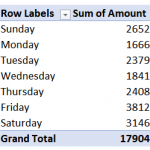
Using the Data Model (or Power Pivot) helps us build some amazing PivotTables. A date table (or calendar table) is integral to most data models as they allow us to group reports by various date periods and use a wide variety of time intelligence functions. Although there are many ways to build such a date…
If you like shortcuts, features, and tools that can save you time in Excel, I’d like to call your attention to a Journal of Accountancy article that includes tips from several Excel experts. I’m honored that my tips were included in the article 🙂 The article includes these main categories of tips: Keyboard shortcuts Quick…

Comparing lists is a fairly common task in Excel, and as with anything, there are many ways to approach it. When we compare two lists, we are essentially trying to find out which names appear in both lists, or, which names appear in only one list. Tony posted a blog comment about how to perform…

Psychologist Abraham Maslow wrote a line that is often referred to as Maslow’s Hammer. It goes something like this: “I suppose it is tempting, if the only tool you have is a hammer, to treat everything as if it were a nail.” I’ve heard the simplified version more often: “If all you have is a…
Let’s say we want VLOOKUP to match the lookup value “North Region” with “North Region Subtotal” stored in the lookup range. We started this series by looking at the 4th argument. We know it can be TRUE or FALSE. FALSE means exact match and TRUE means approximate match. So, what exactly is an approximate match?…