
Excel University Blog
Read on for in-depth articles, tutorials, and videos. Search or browse for specific topics. Be sure to subscribe if you'd like to be notified when we write something new.
Jeff Lenning

In this post, we’ll talk about how to edit the value in a PivotTable cell. Wait…what!? I’ve been using PTs for a long time, and, I’ve always received an error when I try to edit the value in a PivotTable cell. Yes, we’ve been able to edit the label cells, but, not the value cells.…

I think it’s about time for another breakout puzzle … yes! This breakout puzzle is inspired by The Matrix. The Matrix? Yes, the movie, you know … with Neo. If you haven’t seen it, it was a popular movie about 20 years ago. (Wow does time fly.) Anyhow, I love that movie and so decided…

This is the 4th and final post in the Impossible PivotTables series, where we are exploring Power Pivot by looking at some limitations encountered with traditional PivotTables. In this post, we’ll look at how to compute the average when there are multiple rows per item. That is, where a simple sum divided by the count…

Have you heard people talking about Power Pivot and the data model, but you aren’t exactly sure what they are or how to use them? Well, in this article, we’ll use them to build a basic PivotTable. Workbooks used to summarize exported data can potentially be improved by using Power Pivot and the Data Model. Check…
This is the 3rd post in the Impossible PivotTables series. This series is designed to explore Power Pivot. I thought looking at a few limitations of traditional PivotTables would be a fun way to do this. So, in this post, we will look at how traditional PivotTables support a single data table while Power Pivot…
This is the second post in the Impossible PivotTables series, where we are exploring Power Pivot. In the first post, we examined the limitation of calculated field references in a traditional PivotTable. In this post, we’ll address the limitation of using the Show Values As option for subsequent calculations. If we use the Show Values…
This is the first post in a series called Impossible PivotTables. The purpose of this series is to explore Power Pivot. I thought a fun way to do that would be to demonstrate how using the data model enables us to build PivotTables that are either impossible with traditional PivotTables or that require workarounds. I…
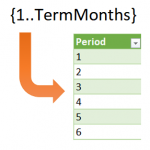
Sometimes in Excel, we want to use formulas to compute row values, but, the number of rows is dynamic and changes periodically. For example, let’s say we want to create an amortization schedule and use it for a variety of loans. Some loans are paid in 36 months, some in 120 months, and some in…
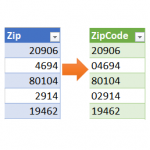
Power Query is an amazing tool, and I love learning about it. In the Power Query Editor, as you click the command icons, Excel is actually writing M code behind the scenes. M code has many more functions than are available in the ribbon. So, the thing to keep in mind is that if you…
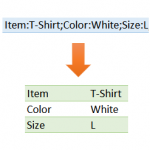
This is the second of two related posts that demonstrate how to use Power Query to deal with rows and delimited lists. In the first post, we combined rows into a delimited list. In this post, we’ll do the opposite and convert a delimited list into rows. Well, what are we waiting for … let’s…