
CHOOSEROWS CHOOSECOLS
When working with tabular data in Excel, there are often times we need to extract specific rows or columns based on custom logic. This is where the CHOOSEROWS and CHOOSECOLS functions come into play. These recently introduced dynamic array functions are powerful alternatives to functions like TAKE and DROP, offering more flexibility by letting us select non-contiguous rows or columns.
Video
Tutorial
In this blog post, we’ll look at how these functions work, walk through practical examples step by step, and see how to nest them within other Excel functions like VSTACK, HSTACK, and FILTER. By the end, we’ll have a solid understanding of how to apply them in real-world workbooks.
What Are CHOOSEROWS and CHOOSECOLS?
CHOOSEROWS and CHOOSECOLS are dynamic array functions introduced to help extract specific rows or columns from a dataset, even when they are not adjacent. Unlike TAKE or DROP which only handle continuous blocks, these functions let us handpick what we need using index positions.
Syntax Overview
=CHOOSEROWS(array, row_num1, [row_num2], ...)=CHOOSECOLS(array, col_num1, [col_num2], ...)
Positive indices count forward from the start of the array, while negative values count backward from the end. This gives us incredible flexibility.
Step-by-Step Examples
Exercise 1: Selecting Columns from a Table
Let’s say we have a data table that runs from January to December. We want to extract just the quarterly columns: March, June, September, and December — along with the Item column.
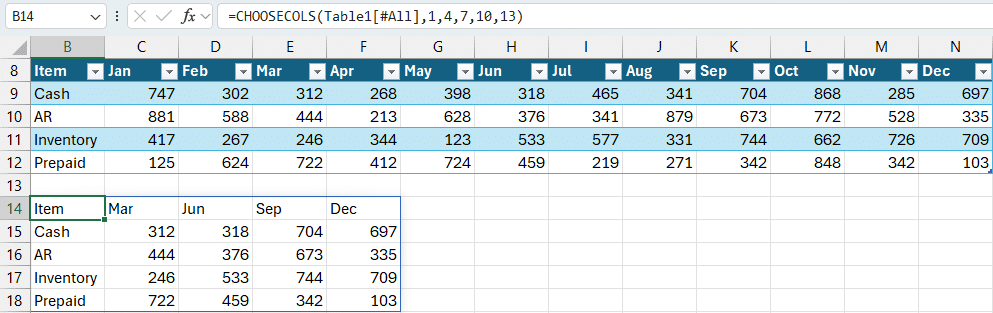
The formula in B14
=CHOOSECOLS(Table1[#All], 1, 4, 7, 10, 13)This formula returns non-adjacent columns from the original dataset. We’re free to define the column index numbers in any order we like.
Selecting Rows
The same concept can be applied to choose specific rows. Suppose we want to extract the 1st, 2nd, and 4th rows from the dataset:
=CHOOSEROWS(Table1[#All], 1, 2, 4)From the end
We can use negative numbers to start at the end. For example, to get the first and last column:
=CHOOSECOLS(Table1[#All], 1, -1)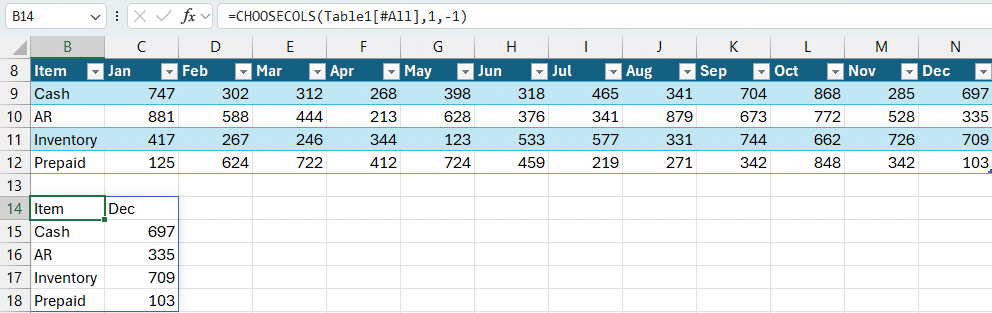
Exercise 2: Aligning Data for VSTACK
If we use VSTACK to combine data from multiple tables, we often face issues where the columns are in different orders. For instance, let’s say we want to combine the values in two bank downloads (each bank has their own column structure):
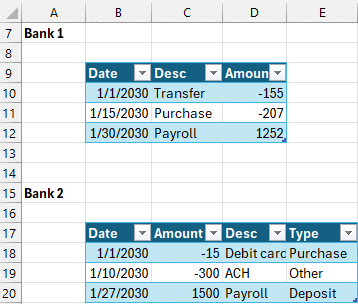
Here’s how we fix it using CHOOSECOLS within VSTACK:

Formula in G9:
=VSTACK(Table2[#All],CHOOSECOLS(Table3,1,3,2))This reorders the columns of Bank 2’s dataset to match the order of Bank 1 before stacking. Super handy when working with disparate datasets!
Exercise 3: Pairing CHOOSECOLS with FILTER
We have a table of transaction data, like this:
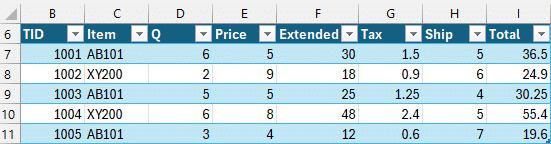
Suppose we want to filter for a specific item such as the value in cell B13 (currently “AB101”) and return only selected columns like Transaction ID, Quantity, Price, and Total:
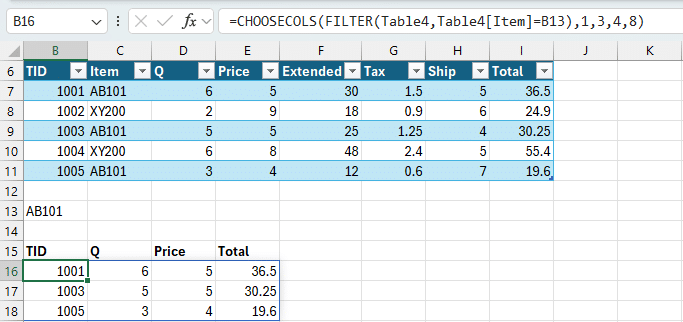
Formula in B16:
=CHOOSECOLS(FILTER(Table4,Table4[Item]=B13),1,3,4,8) This dynamic formula filters rows based on a condition and then selects only the necessary columns from that filtered dataset. It’s efficient and reduces the need for helper columns or manual clean-up.
Summary
The CHOOSEROWS and CHOOSECOLS functions give us granular control over our datasets in Excel. They are ideal when:
- We want to pull non-contiguous rows or columns
- We’re working with inconsistent data structures
- We want to prepare data for stacking operations like
VSTACKandHSTACK - We want easier, cleaner filtering and output
They also shine when combined with modern Excel functions, making our workbooks more dynamic and easier to maintain.
Download Sample File
Download the exercise file used in these examples to follow along:
FAQs: CHOOSEROWS and CHOOSECOLS in Excel
- Can CHOOSEROWS or CHOOSECOLS return non-adjacent data?
- Yes, both functions allow selecting non-contiguous rows or columns by specifying multiple explicit indices.
- Do these functions work in older versions of Excel?
- No, they’re only available in Excel for Microsoft 365 and Excel 2021+ as part of dynamic array functions.
- Can I use CHOOSECOLS to reorder columns?
- Absolutely. Just list the column numbers in the desired order.
- What’s the difference between CHOOSECOLS and TAKE?
- While
TAKEretrieves continuous columns or rows from the beginning or end,CHOOSECOLScan pick specific indices anywhere in the dataset. - Can I use negative indexes with CHOOSEROWS?
- Yes. Negative numbers count from the last row or column, similar to Python indexing.
- Can these functions be nested within FILTER or VSTACK?
- Yes, that’s one of their strengths. They integrate seamlessly with functions like
FILTER,VSTACK, andHSTACK. - What happens if my index numbers are out of range?
- Excel will return a #VALUE! error if any specified row or column index does not exist in the source array.
- Are CHOOSEROWS and CHOOSECOLS volatile functions?
- No, they are not volatile and will only recalculate when their dependent cells change.
- How do these compare with INDEX?
- The
INDEXfunction can return specific items but doesn’t support returning full arrays the same wayCHOOSEROWSandCHOOSECOLSdo. - Can I use named ranges with CHOOSEROWS/CHOOSECOLS?
- Yes, named ranges or structured table references work just fine as the array argument.

Excel is not what it used to be.
You need the Excel Proficiency Roadmap now. Includes 6 steps for a successful journey, 3 things to avoid, and weekly Excel tips.
Want to learn Excel?
Our training programs start at $29 and will help you learn Excel quickly.