
Excel University Blog
Read on for in-depth articles, tutorials, and videos. Search or browse for specific topics. Be sure to subscribe if you'd like to be notified when we write something new.
Posts

If you haven’t checked out Excel’s conditional formatting feature recently, you’re missing out on some nice enhancements. The feature formats a cell based on its value. Excel continuously monitors the cell value and updates the formatting as the cell value changes. Conditional formatting has traditionally been limited to basic cell formatting such as fill and…

I’m happy to announce the immediate availability of Excel University’s next guest lecture: Xtreme PivotTables by John Michaloudis. Earn 16 CPE hours while learning more about PivotTables…what could be better? This course provides a comprehensive examination of Excel’s PivotTable feature and explores many powerful capabilities. This course digs into so many details that even experienced PivotTable…

With a simple custom format code, we can display negative numbers as positive…but…why would we want to? So that we can simplify our formulas and make our workbooks more reliable of course. Let’s check it out. Objective Before we get to the mechanics, let’s confirm our goal. We have a worksheet, in this case a little…
Alright friends, I have an update about Excel University Volume 4. I’ve just about completed the initial draft, and am very pleased with how it is shaping up so far. Volume 1 is the foundations volume. Volume 2 is where we discuss formula-based reports. Volume 3 is where we cover PivotTable reports. Volume 4 is…

In this post, we’ll perform a two-dimensional lookup with Excel’s VLOOKUP function. Objective Let’s begin by clarifying our objective and what is meant by the term two-dimensional lookup. We have stored our price list in a table, and the price for each item varies based on the region. This is illustrated in the screenshot below. To…

Did you know that PivotTables can automatically group date fields by month? And by quarter and year? This date group capability makes it easy to summarize data in monthly columns without writing a single formula. Check out my recent California CPA Magazine article for the details. Publication: California CPA Magazine Author: Jeff Lenning CPA Date: May 2015…

Let me ask you a question. How do you know when a user has entered a value into a formula cell, essentially overriding your formula? Since this is Excel, there are several ways to address this issue, but starting with Excel 2013, we can use conditional formatting with the new ISFORMULA function. Objective Our worksheet…

I’m excited to announce the Excel University scholarship program! Excel University will recognize outstanding accounting students enrolled in an accredited college or university in the US, and will provide a $500 cash award as well as free enrollment into our online training program. These scholarships are awarded annually. Please help me spread the word by forwarding…
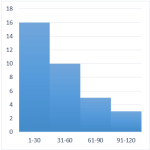
A histogram graphically displays the number of items that fall within equal intervals, or, bins. For example, the number of days with a high temperature between 71-80 degrees, 81-90, and 91-100, the number of students with test scores between 60-69, 70-79, 80-89, or the number of invoices that are due in 31-60, 61-90, or 91-120…

The terms Moving, Rolling, and Trailing are commonly used to describe the same calculation idea…that we want to operate on the previous say 3, 6, or 12 data rows. In this post, we’ll allow the user to define the number of rows to include and use the OFFSET function to dynamically define the desired range. Objective…