
Excel University Blog
Read on for in-depth articles, tutorials, and videos. Search or browse for specific topics. Be sure to subscribe if you'd like to be notified when we write something new.
Power Query

Microsoft recently updated the built-in tools for retrieving stock quotes into Excel. If you’re typing closing prices into Excel manually, my recent California CPA Magazine article may be able to help you get it done faster. Specifically, it talks about how the Stock data type retrieves current quotes and related information, and how Power Query…

In this post, we are going to use the data model to improve our reporting process. This is the fourth post in the Stop Wasting Time series, and this is where everything we’ve learned comes together. By the time we have finished this post, updating our report will be extremely easy. In fact, it will…
We are in the middle of a series called Stop Wasting Time, where we are learning about Excel features that help us improve how we update a report. In the beginning of our journey, we were updating the report manually. Now, as we’ve learned more, we’ve been able to automate parts of it. That is,…
This is the second post in the Stop Wasting Time series. In this post, we learn how Power Query can help us update our report in less time. After all, why would we want to spend more time than necessary updating it? That is called “wasting time” and we just don’t like wasting such a…

A few weeks ago I wrote a blog post on how to create a graphical calendar using a PivotTable. I received a few questions about how to insert event names into the calendar. Generally, PivotTable value fields support numeric values (such as day 1, 2, 3), and not text values (such as Filing Deadline or…

You’ve heard the terms “Power BI,” “Power Query” and “Power Pivot,” but maybe aren’t sure what they are. Good news! They are free tools from Microsoft and this article will talk you through them. And, while we’re at it, we’ll also talk about Pivot Tables and Pivot Charts. Power and Pivot

Let’s say you have a single-column list of transactions. You want to add up the amount values, which are on every say 5th row. This is a perfect task for Power Query. So, in this post, I’ll demonstrate how to set up a query that removes and keeps a defined number of rows in a…

There are several ways in Excel to find missing IDs (or gaps) in a big list of sequential IDs, such as check numbers or invoice numbers. In this post, we’ll use Power Query so that each time we have a new list, we simply click Refresh. Excel then creates an updated list of the missing…

Let’s say we are building a query to clean up and prepare some data for use, and we have a specific value we need to use within the query. But, we would like to be able to change the value as desired, before refreshing the query. One option would be to enter and update that…
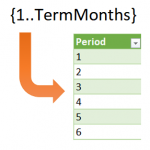
Sometimes in Excel, we want to use formulas to compute row values, but, the number of rows is dynamic and changes periodically. For example, let’s say we want to create an amortization schedule and use it for a variety of loans. Some loans are paid in 36 months, some in 120 months, and some in…